Starline
3D First-person Puzzle Game
Description
This project was made as my 2nd year's final project, I convinced my teachers to allow me to work with a group of people I've worked with before and knew I could work. Which worked out amazingly because our group won best game of the year in our school's competition!
This project also had it's own rules / requirements.
- It had to have 3 Levels
- The levels were referred to as a "cell" and could not exceed 20 meters in length, width, or height (20x20x20 meters).
- You had to solve the current cell u were in, before being able to continue onto the next cell.
- The game had to have one mechanic that came back in every cell.
Team
This was the biggest group I managed as a Scrum master consisiting of 2 Developers and 4 Artists, which for a school project was quite a lot. It ended up working really nicely because I did my best to focus on good communication between everybody as well as keeping it fun for everyone.
Team Members: 6
-
Developers
- Leandro Bonora (Scrum master, Level Design, Programming)
- Milan Driece (Programming)
- Aiden Glen (Lead artist, 3D)
- Annelot van der Leden (2D)
- Anna Heijblom (3D, Post Processing)
- Jordy Gouw(3D)
- Hikaru Shirosu (Pianist, Componist, Music)
Artists
Special Credit
I would like to quickly mention the special credit towards Hikaru Shirosu, we coincidentally found his music during the production of the game, and I loved it so much I think I listened to his music almost everyday. And after a while I realized how nicely his music would fit in our game. So I ended up reaching out to Hikaru and he loved the idea and allowed us to use his music in our game, which I'll forever be grateful for! If ur interested check his music! His Youtube Channel I highly recommend: Prelude No.3, Final Stars.
Work Process
I have to admit it took some time to get everything fleshed out, especially the 1 reocurring game mechanic we wanted. When we did eventually settle on our game mechanic we went all out. I worked on a variety of things which includes level design, pitch deck design, optimization/polish by using methods such as occlusion culling, I was also very involved with my Artists because I think it's very beneficial to do so especially as Scrum Master.
A couple of examples of the stuff I worked on are: All Menus, AudioManager, Platform, Bookspawner and the DialogueSystem
Here's a link to the Development Commentary Video I made alongside my other dev and lead artists feel free to watch it, please note it is unfortunatly in Dutch
Teleport Player
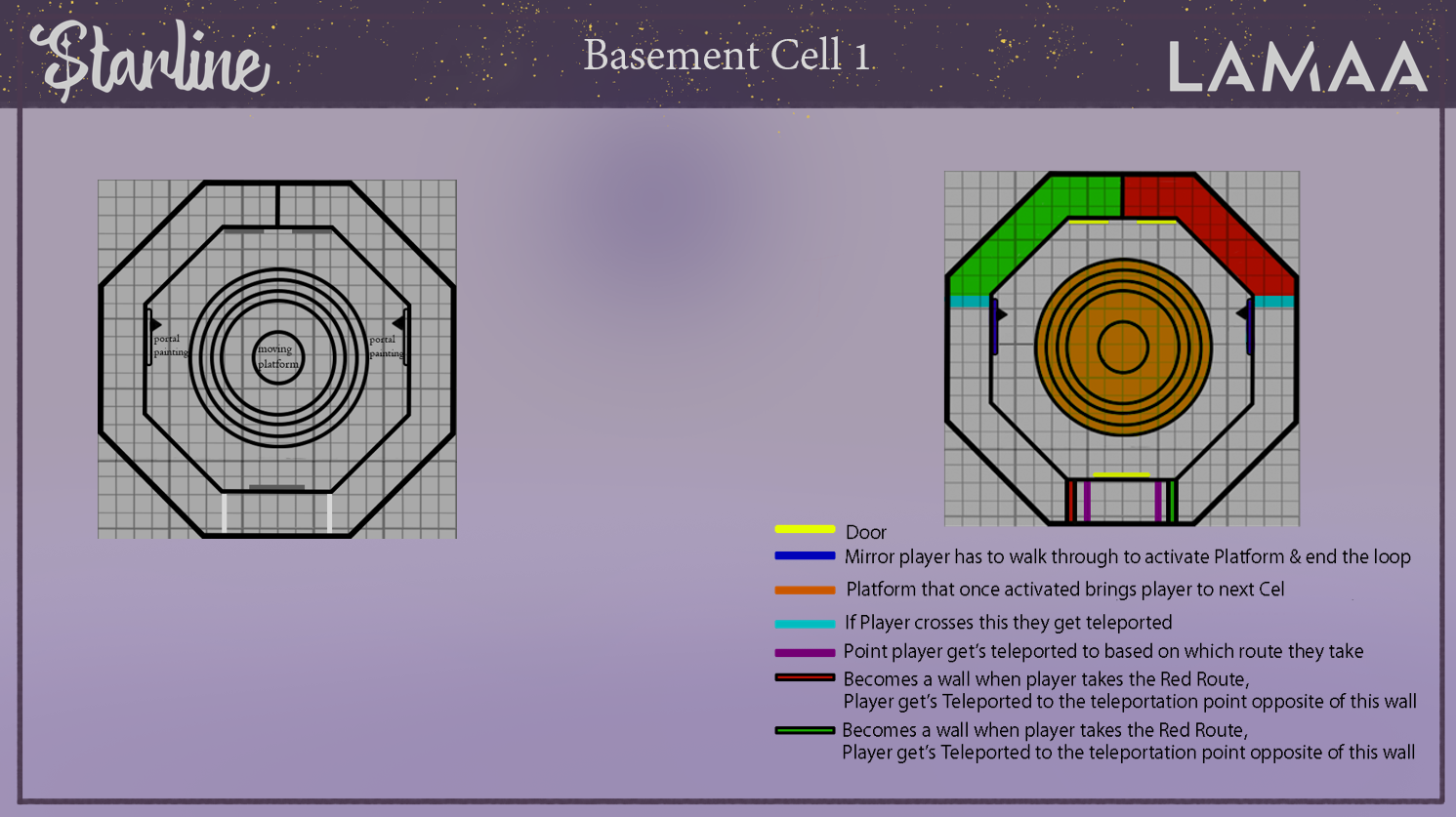
For this idea, I was inspired by Antichamber, and I wanted to add a non-euclidean room. It was a bit tricky to work with since the room only allowed for 20m³, so I had to become creative with the space we had. After playtesting, we did alter the design (Mainly instead of 2 doors at the front/top, only 1).
It basically works as follows: no matter if you go up or down the stairs, you will always end up on the middle floor again. Once teleported, there will be a wall as soon as you round the corner, so you can't proceed. Most players end up going through the door they saw before meeting a dead end. This, in turn, puts them back on the middle floor. The solution is to, once teleported, simply go backward and through the fake wall behind you.
public class TeleportPlayer : MonoBehaviour
{
    [Header("Triggers")] // Rework when available
    [SerializeField] private GameObject m_leftTrigger;
    [SerializeField] private GameObject m_rightTrigger;

    [Header("Transforms")]
    [SerializeField] private Transform m_playerTransform;
    [SerializeField] private Transform m_planeTransform;

    [Header("Player Position")]
    [SerializeField] private float posX = 0.0f;
    [SerializeField] private float posY = 0.0f;

    [Header("Offsets")]
    [SerializeField] private float m_hallOffset = 2.75f;
    [SerializeField] private float m_angleOffset = 90f;
    [SerializeField] private float m_yRotationOffset = 60f;
    [SerializeField] private float m_heightOffset = 18.4f;

    [Header("Timer")]
    [SerializeField] private float m_waitTime = 2.5f;

    private float m_planeWidth = 1f;
    private float m_planeHeight = 1f;
    private float timer;
    private bool m_teleported;

    ObjectVisibility ov;
    PathTrigger lt;
    PathTrigger rt;


    private void Start()
    {
        ov = GetComponent();
        lt = m_leftTrigger.GetComponent();
        rt = m_rightTrigger.GetComponent();
    }


    /// Checks if the player has crossed the Y Pos where they get teleported and get teleported if they do and haven't been teleported yet/
    ///
    /// Then checks when u are teleported how much time is in between the teleportation so u don't get stuck whilst teleported or get teleported multiple times
    /// Get player's position in world space
    /// Convert world position to local coordinates of the plane
    /// Calculate normalized position values on the plane
    ///
    /// Debug.Log("Normalized Position: (" + posX.ToString("F2") + ", " + posY.ToString("F2") + ")"); //Debug Player Position on the Plane
    private void FixedUpdate()
    {
        if (posY >= -m_hallOffset && !m_teleported) Teleport();
        if (m_teleported)
        {
            timer += Time.fixedDeltaTime;
            if (timer >= m_waitTime)
            {
                m_teleported = false;
                timer = 0f;
            }
        }
        Vector3 playerPosition = m_playerTransform.position;
        Vector3 localPosition = playerPosition - m_planeTransform.position;

        posX = localPosition.x / m_planeWidth;
        posY = localPosition.z / m_planeHeight;
    }

    /// TargetPostion is based on the parameters given when the Function is called
    /// It calculates the target position based on the provided normalizedX and normalizedY values, multiplied by the plane's width and height,
    /// respectively. The plane's position is then added to the result, forming a target position in the world space.
    ///
    /// Sets the player position to be alligned with the heightoffset
    /// Rotates the player to face correct place.
    ///
    /// Finally sets the teleported bool to true
    /// And Syncs all transforms.
    private void TeleportPlayerToPosition(float normalizedX, float normalizedY, float rotationOffset)
    {
        Vector3 targetPosition = new Vector3(normalizedX * m_planeWidth + m_planeTransform.position.x, m_heightOffset, normalizedY * m_planeHeight + m_planeTransform.position.z);
        m_playerTransform.SetPositionAndRotation(targetPosition, Quaternion.Euler(0f, rotationOffset, 0f));
        m_teleported = true;
        Physics.SyncTransforms();
    }

    /// Based on which trigger is triggered it sends the player to a new position, with new rotation
    /// And calls the right function based on which trigger is triggered
    private void Teleport()
    {
        if (rt.trigger)
        {
            TeleportPlayerToPosition(-m_hallOffset, -posX, m_yRotationOffset);
            ov.RightPathTaken();
        }
        else if (lt.trigger)
        {
            TeleportPlayerToPosition(m_hallOffset, posX, -m_yRotationOffset);
            ov.LeftPathTaken();
        }
    }
}
The TeleportPlayerToPosition function operates based on the 20x20 plane the player walks on. It tracks the player's precise coordinates on this plane. To make teleporting the player as smooth and seamless as possible, when teleported the player arrives in another hallway with the original position they had and an added 90-degree camera rotation. Which if they now open the door infront of them it's the same cell they originally came from.
Looking back I should've made a more solid way of adding the Triggers and not a Left and Right Trigger respectively. I would tackle this by just having a Trigger script that depending on let's say the original player position then give the correct offsets.
Sidenote after playtesting we discovered some people don't ever get the solution so we added a book that spawns each time the player goes through the door again which has a hint helping them :D
Dialogue System
I made this dialogue system for the books we have in the game that as well as giving tips to players also give more info about the lore of the game. We chose this way of giving information rather than info dumping because we thought this would be more fun and work better!
public class Dialogue : MonoBehaviour
{
    [SerializeField] private TextMeshProUGUI m_textComponent;
    [SerializeField] private float m_textSpeed;
    [SerializeField] private string[] m_lines;
    [SerializeField] private float m_startDelay;
    private int index;
    private bool m_canSkip;

    PlayerActions pa;
    PlayerController pc;

    private void OnEnable()
    {
        // Clears the text component and starts the dialogue
        m_textComponent.text = string.Empty;
        StartDialogue();
        m_canSkip = false;
        StartCoroutine(StartDelay());
    }


    private void Start()
    {
        // Finds references to player actions and controller
        pa = FindObjectOfType();
        pc = FindObjectOfType();
    }

    private void Update()
    {
        if (!m_canSkip) return;
        if (Input.GetMouseButtonDown(0) || Input.GetKeyDown(KeyCode.E))
        {
            if (m_textComponent.text == m_lines[index]) NextLine();
            else
            {
                // Stops typing and shows the full line
                StopAllCoroutines();
                m_textComponent.text = m_lines[index];
            }
        }
    }

    public void ChangeLines(string newText)
    {
        // Changes the first line of dialogue
        m_lines[0] = newText;
    }

    private void StartDialogue()
    {
        // Initializes dialogue and starts typing
        index = 0;
        StartCoroutine(TypeLine());
    }

    private void NextLine()
    {
        if (index < m_lines.Length - 1)
        {
            // Moves to the next line and starts typing
            index++;
            m_textComponent.text = string.Empty;
            StartCoroutine(TypeLine());
        }

        else
        {
            // Ends the dialogue and resumes gameplay
            if (PauseMenu.Instance) PauseMenu.Instance.m_gamePaused = false;
            if (InGameUI.Instance) InGameUI.Instance.TurnOnInGameUI();
            gameObject.SetActive(false);
            pa.m_isInteractable = true;
            pc.m_allowedToJump = true;
        }
    }

    private IEnumerator TypeLine()
    {
        // Types out the text line by line
        foreach (char c in m_lines[index].ToCharArray())
        {
            m_textComponent.text += c;
            yield return new WaitForSeconds(m_textSpeed);
        }
    }

    private IEnumerator StartDelay()
    {
        // Delays the ability to skip text
        yield return new WaitForSeconds(m_startDelay);
        m_canSkip = true;
    }
}
I have given the entire script but I will be highlighting: Next Line works by first checking if there are any more lines left to write and if there are any lines
(So a whole sentence).
It will start writing those by calling the coroutine TypeLine.
The coroutine TypeLine will then for each character in the current line type it out and wait for the specified time,
and keep doing that until there are no more characters left. Which results in a nice letter for letter dialogue system.
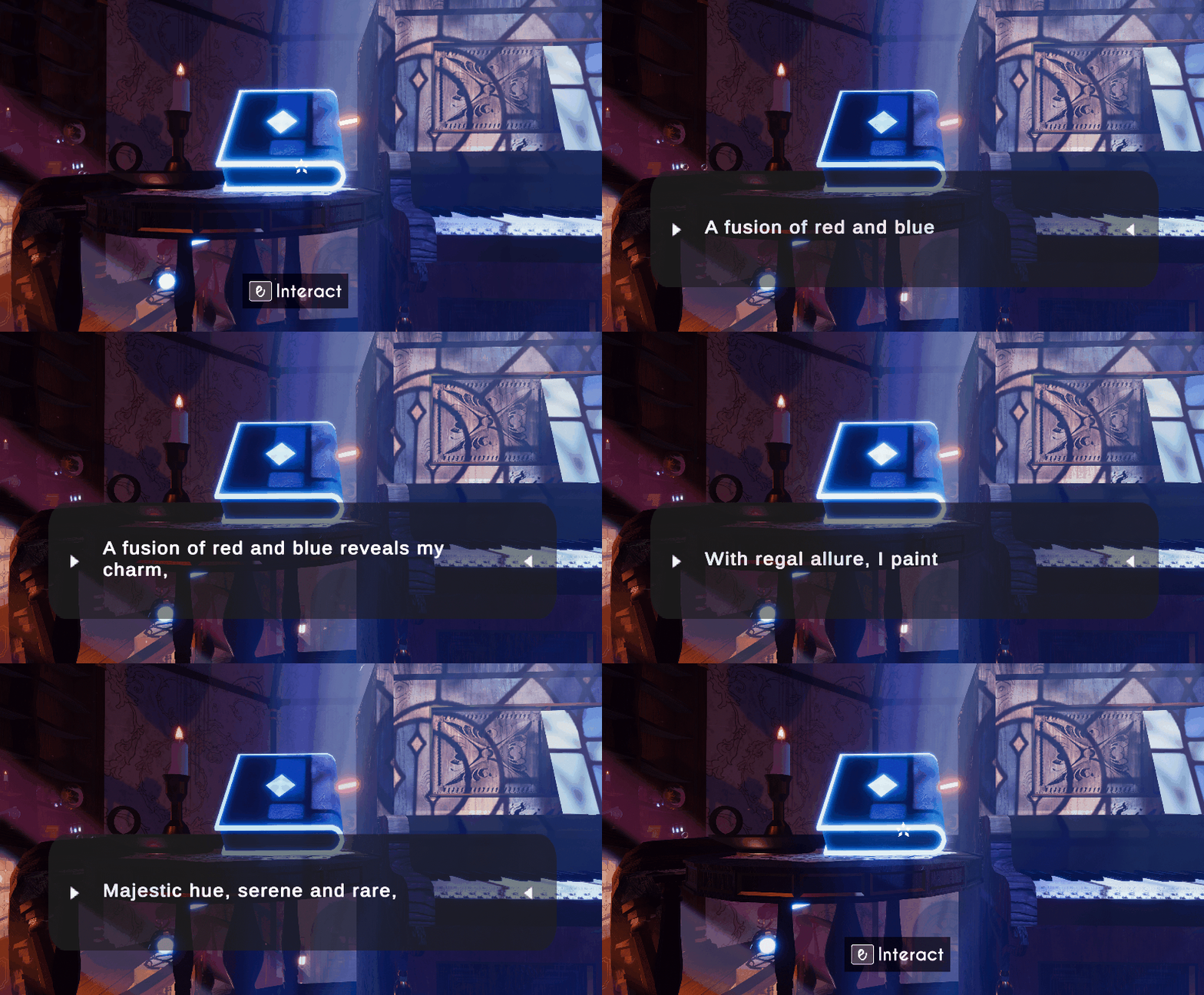
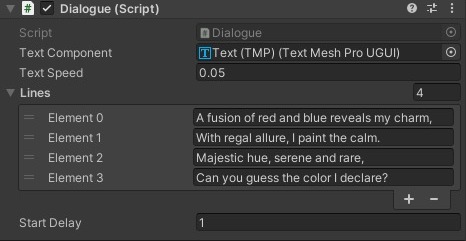
Here you can see a player interact with the Dialogue System and how the Dialogue System looks in the inspector, as u can see each Element is it's own line.
Reflection
I really enjoyed this project a lot, I spent way too much time on this project but it was so fun especially seeing everything come together was so nice. I wouldn't have done a lot differently than from the way I did things.
The one thing I would've liked to do better was probably coming up with the Mechanic and having a clear idea for it. However I feel like that comes with time and is something I am actively trying to improve on.
My favorite part has to be the fact we got personal permission from Hikaru Shirosu to use his music, in general the whole interaction with him was very wholesome and I loved it.
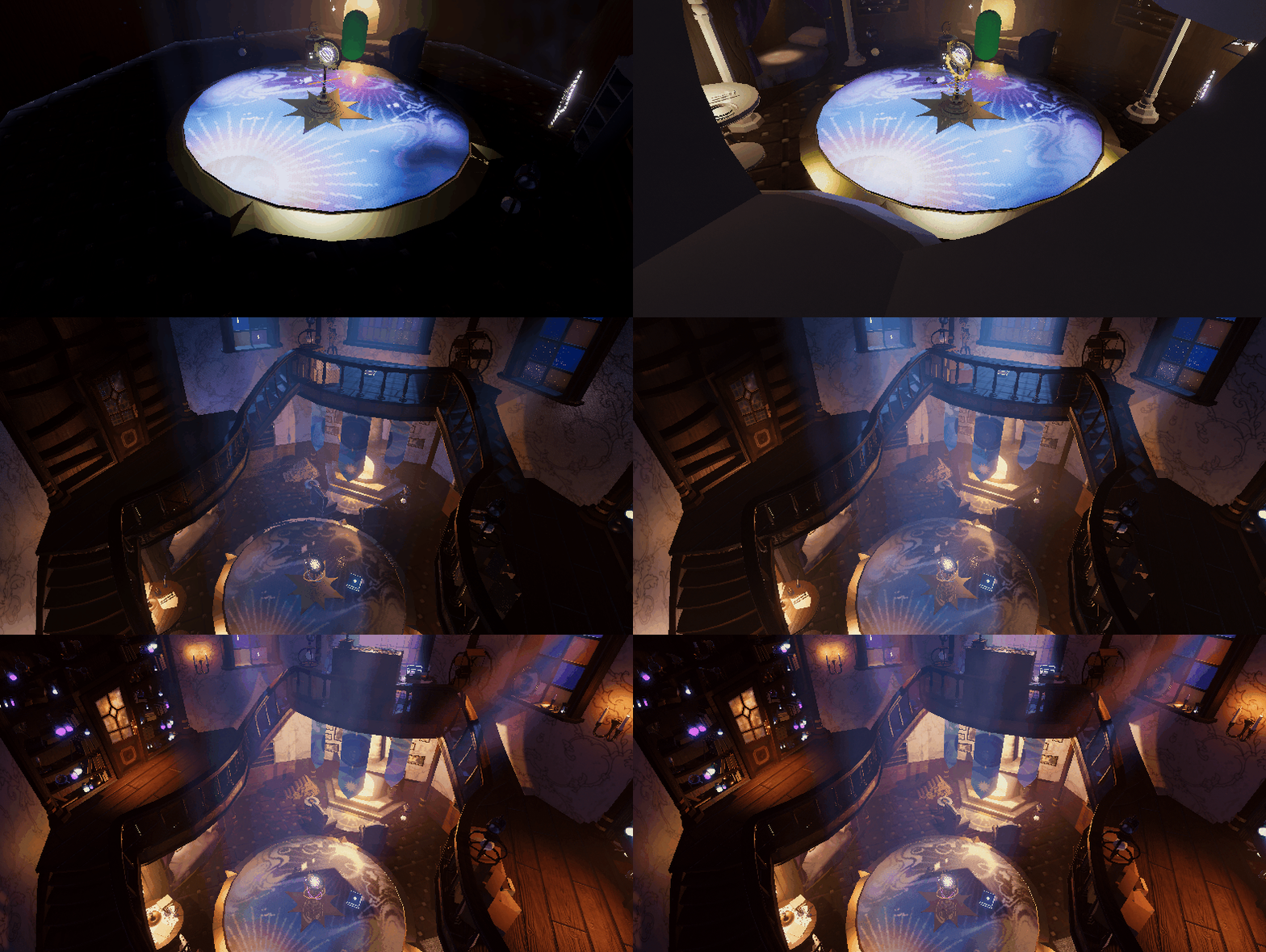
Here u can see some of the progression stages!